

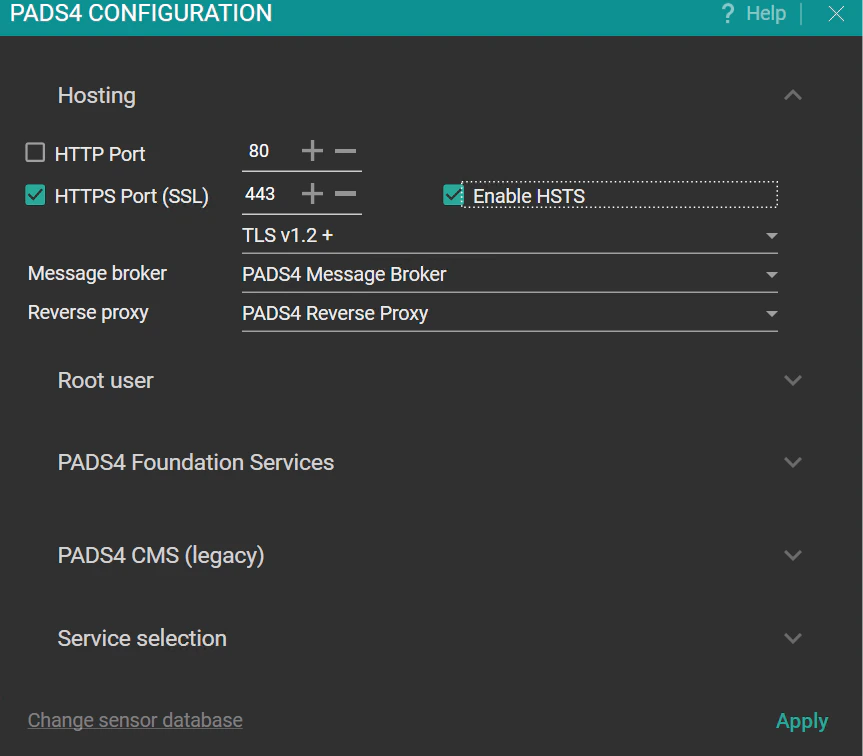
Hosting configuration
Define access ports for the PADS4 interface and secure them with HTTPS.- HTTP Port: For PADS4 CTRL Center (default: 80).
- HTTPS Port (SSL): Enables secure communication (default: 443).
- Enable HSTS: Redirects HTTP to HTTPS automatically.
- TLS Version: Select TLS 1.2+ or 1.3. This is the minimum TLS version that is used. If you select TLS 1.2+ and TLS 1.3 is available, TLS 1.3 is used.
Message broker configuration
- PADS4 Message Broker This is the default setting and applicable for most installations.
- RabbitMQ This is for legacy or specific installations.
Reverse proxy configuration
- PADS4 Reverse Proxy This is the default setting and applicable for most installations.
- NGinx This is for legacy or specific installations.
Root user configuration
- Username: su/root
- Password: Enter a strong password for su\root user; required for system login.
PADS4 Foundation Services
- Custom Storage Location: If required, change the default storage location for PADS4 Foundation Services.
This setting does not affect the content folder. You can define the content folder location for each domain using PADS4 System Management.
PADS4 CMS (legacy)
These settings are for PADS4 CMS 1.0.- Default Language: Set the default language of the database.
- Database Configuration: Select the database type for storage:
- SQLite This is the default setting and applicable for most installations.
- Microsoft SQL Server
- Hostname and port for Microsoft SQL Server
- Username and password for Microsoft SQL Server
If you change the database while PADS4 is in use, existing data is not migrated. The new database starts empty.
Service selection
To boost performance, disable unused microservices on the PADS4 Server. Configurable options include NDS.PADS4.FIDS.Server, NDS.Services.PowerBI, and NDS.Services.Teams.Integration.Sensor database
Click Change Sensor Database.- Select the database type you want to use. You can choose from the following options:
- SQLite (default)
- SQL Server
- PostgreSQL
- MongoDB
- The selected database is created.
If you change the database while PADS4 is in use, existing data is not migrated. The new database starts empty.